main loading
Loading...
Suspnse를 이용하여 UserInfoSection 컴포넌트에서 loading 상태 분리하기
최종적으로 원하는 결과물은 아래와 같다
-
- ErrorBoundary 를 이용하여 UserInfoSection 컴포넌트에서 error 상태 분리하기
-
- 기본적인 컴포넌트 구성하기
-
- 에러 발생시키기
-
- 에러 바운더리 설치하기
-
- 에러 바운더리 적용하기
Suspnse를 이용하여UserInfoSection컴포넌트에서loading상태 분리하기ReactQuery적용하기- 에러 잡기
Suspnse적용하기
- api 의 data 에 대한 타입 검증은 zod 에서 관리하고 처리한다
ReactQuery 적용하기
reactQuery는 한국에서 가장 대중적으로 사용되는 api 상태 관리 라이브러리다
react 공식문서에도 추천 라이브러리중 하나로 소개된다
Otherwise, consider using or building a client-side cache. Popular open source solutions include React Query, useSWR, and React Router 6.4+. You can build your own solution too, in which case you would use Effects under the hood but also add logic for deduplicating requests, caching responses, and avoiding network waterfalls (by preloading data or hoisting data requirements to routes).
- 도큐먼트는 Effect 내에서 서버 data를 fech 하는 방법에 대해서 가이드하지만 상당히 수동적으로 추후 19버전에서 서버컴포넌트 개념이 도입 될 경우 사용하기 힘들다는 단점이 존재한다고 안내합니다.
npm i @tanstack/react-query
UserInfoSection 컴포넌트에 reactQuery 의 useQuery를 적용하기
import { useQuery } from "@tanstack/react-query";
+ import { withErrorBoundary } from "react-error-boundary";

function UserInfoSection() {
+  const { data } = useQuery<{name: string}>({
+    queryKey: ["userInfo"],
+   queryFn: () => fetch("http://localhost:5173/api/user").then(async (response) => {
+      return await response.json();
+   })
+  });

-  return <div>{some.name}</div>;
+  return <div>{data.name}</div>;
}

const UserInfoSectionWithBoundary = withErrorBoundary(UserInfoSection, {
  fallback: <div>문제 발생</div>,
});

export default UserInfoSectionWithBoundary;
에러잡기
이제 data 객체가 존재한다고 가정해보자
type Data = {
  name: string
}
그럼에도 위 컴포넌트는 문제 발생 이라는 에러를 출력한다

reactQuery의 data 는 비동기 상태이기때문에 실제 데이터가 undefined일 가능성이 존재한다
가장 쉬운 방법으로 ?옵셔널체이닝 키워드를 이용하는 것이다
+ // 옵셔널 체이닝 삽입
+ <div>{data?.name}</div>;

Suspnse 적용하기
그러나 생각해보면 UserInfoSection 컴포넌트에서 react-query의 data 를 Optional chaining 을 이용하여 에러를 처리하는 것이 정말 옳은것일까 ?
로딩 상태를 처리하기 위해서 Optional chaining 을 사용하는 것은 차선책이다
data 객체를 사용할 때마다 지속적으로 ? 키워드를 사용해야하며 이는 타입스크립트를 사용하는 이유를 스스로 없애는 것과 마찬가지다
따라서 우리는 react 공식문서에서 제공하는 Suspnse를 활용 하여 loading
상태를 UserInfoSection 에서 분리시키자
App.tsx
+ <Suspense fallback={<div>loading</div>}>
	 <UserInfoSectionWithBoundary />
+ </Suspense>
UserInfoSection.tsx
import { useQuery } from "@tanstack/react-query";
import { withErrorBoundary } from "react-error-boundary";

function UserInfoSection() {
  const { data } = useQuery<{name: string}>({
    queryKey: ["userInfo"],
    queryFn: () => fetch("http://localhost:5173/api/user").then(async (response) => {
      return await response.json();
    })
  });

-  return <div>{data?.name}</div>;
+  return <div>{data.name}</div>;
Suspnse 를 사용하여 로딩상태를 분리했기에 UserInfoSection 컴포넌트는 아래로부터 자유로워 진다
- 에러를 신경쓰지 않아도 된다. 단순히 에러를 상위로 던지자
- 로딩 상태를 신경쓰지 않아도 된다. 로딩상태일 경우 Suspnse가 로딩 상태를 나타낸다
- Optional chaining 을 없애 타입스크립가 가지는 타입에 대한 강점을 계속 유지 할 수있게 된다
UserInfoSection컴포넌트는 그저 자신이 가지는 UI와 상호작용만 신경 쓰면 된다
⚠️⚠️ 그러나 !! ⚠️⚠️
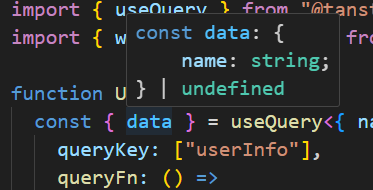
여전히 우리 UserInfoSection 컴포넌트는 data 가 undefined를 반환한다고 나오며
붉은줄이 그인다 name 이 undefined 일 가능성이 존재한다.
{data.name}