main loading
Loading...
- 작성당시 node 버전은 22.0.0 버전입니다.
# 필요한 라이브러리 설치
pnpm install -D jest jest-environment-jsdom @testing-library/react @testing-library/jest-dom
# jest 환경 구성 설정
pnpm create jest@latest

√ Would you like to use Jest when running "test" script in "package.json"? ... yes
√ Would you like to use Typescript for the configuration file? ... yes
√ Choose the test environment that will be used for testing » jsdom (browser-like)
√ Do you want Jest to add coverage reports? ... yes
√ Which provider should be used to instrument code for coverage? » v8
√ Automatically clear mock calls, instances, contexts and results before every test? ... yes
이후 자동생성된 jset.config.ts 파일을 next.js 에 맞게 아래의 내용으로 교체하고 jest.setup.ts 파일을 생성해준다
// 파일 경로 <projectName>/jset.config.ts
import type { Config } from 'jest'
import nextJest from 'next/jest.js'

const createJestConfig = nextJest({
  // Provide the path to your Next.js app to load next.config.js and .env files in your test environment
  dir: './',
})

// Add any custom config to be passed to Jest
const config: Config = {
  coverageProvider: 'v8',
  testEnvironment: 'jsdom',
  // Add more setup options before each test is run
  setupFilesAfterEnv: ['<rootDir>/jest.setup.ts'],
}

// createJestConfig is exported this way to ensure that next/jest can load the Next.js config which is async
export default createJestConfig(config)
//  파일 경로 <projectName>/jest.setup.ts
import '@testing-library/jest-dom'
설치된 jest가 정상 동작하는지 확인 하기 위한 간단한 테스트 코드를 작성한다
// 파일 경로 <projectName>/src/app/page.tsx
"use client";

import { useState } from "react";

export default function Page() {
  const [count, setCount] = useState(0);
  const handleClickButton = () => {
    setCount((prev) => prev + 1);
  };

  return (
    <div data-testid="home">
      <button type="button" onClick={handleClickButton} data-testid="button">
        click me
      </button>
      <span data-testid="count-section">{count}</span>
    </div>
  );
}
// 파일 경로 <projectName>/src/__tests__/page.test.tsx
import "@testing-library/jest-dom";
import { fireEvent, render } from "@testing-library/react";
import Page from "../app/page";

describe("Page", () => {
  it("home 테스트 아이디가 정상 출력된다.", async () => {
    const { findByTestId } = render(<Page />);
    const home = await findByTestId("home");
    expect(home).toBeInTheDocument();
  });

  it("클릭시 카운트가 증가한다.", async () => {
    const { findByTestId } = render(<Page />);
    const button = await findByTestId("button");
    const countSection = await findByTestId("count-section");
    expect(countSection).toHaveTextContent("0");
    fireEvent.click(button);
    expect(countSection).toHaveTextContent("1");
  });
});
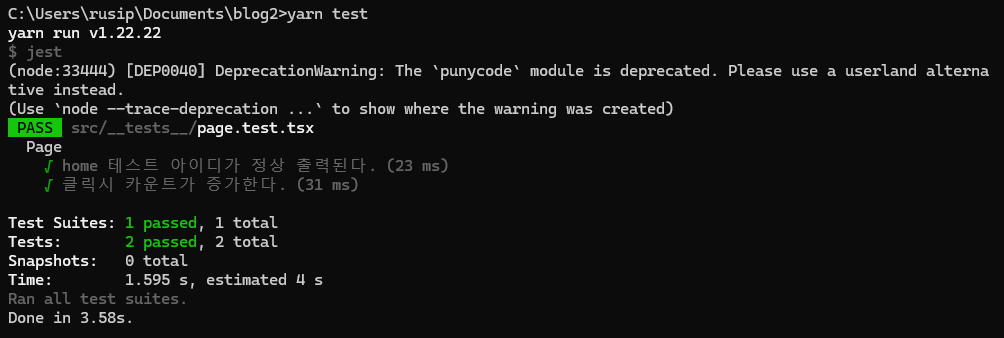
pnpm run test 명령어를 입력하면 정상적으로 테스트가 동작한다.
- 테스트파일의 타입을 지원하기 위한 .tsx
@types/jest라이브러리와ts-node라이브러리 역시 추가 설치해준다.
pnpm i --save-dev @types/jest pnpm i --save-dev ts-node
- pnpm 사용시 테스트시 경고문구가 뜰경우 yarn 으로 설치시 해결됨
- 참고문서